Using Whatsapp on Pc rocks big time.. I really enjoy it, chatting and connecting with my friends via pc b'cos i have little or no time for my mobile these days.
Now how can one use whatsapp on pc? By default, there is no available version for whatsapp on pc. But with the help of a software called "
Bluestacks", this is being made possible.
Bluestacks BlueStacks is an Android app player, with which you can run your games, apps, from yor Smartphones and/or tablets.. With this simple tutorial and help of this software, we can run whatsapp messenger on our pc.
Now lets roll on.
To get this done, you will need a working phone number because a confirmation sms will be sent to you.
Follow the below steps to Start using whatsapp messenger on your pc.
#1. Download and install
Bluestacks App PlayerStep #2. Run Bluestacks and Click on the search Icon at the top right corner of your screen.
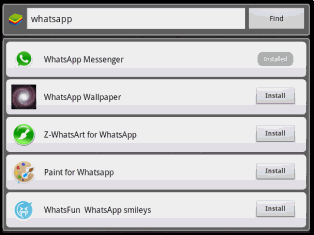
Step #3. Enter "Whatsapp" In the search Box and click on find. You will see many search results. Click and install "Whatsapp Messenger"
Step #4. After installing, run whatsapp messenger on Bluestacks. Now, you will need to configure your whatsapp with your phone number.
Step #5. Put your phone number in the provided space and follow the activation instruction and enter your 6 digits activation code and you are ready to use your whatsapp on Pc.
Title : How To Use Whatsapp Messenger On Pc
Description : Using Whatsapp on Pc rocks big time.. I really enjoy it, chatting and connecting with my friends via pc b'cos i have little or no time f...
